
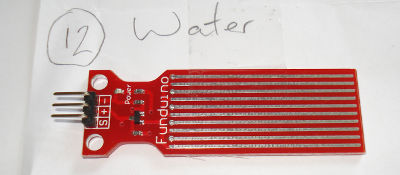
| A water sensor. |
|
There are 3 clearly marked pins; +, - and S. + is +5V, - is GND and S is some kind of sensor - so I investigated.
|
Wired up. Arduino 5V -> breadboard -> resistor -> LED -> WaterSensor + WaterSensor - -> breadboard -> Arduino GND The yellow pin from the water sensor is now ready to read. |

|
This is the code that I used.
/*
Read the water sensor. Try reading the analog value, and / or the digital value, to see what returns.
*/
int analogInputPin   = 3;
int digitalInputPin  = 2;
int wait = 1000;
long analogInputVal;
int digitalInputVal;

void setup()
{
		pinMode(analogInputPin,   INPUT);
		pinMode(digitalInputPin,   INPUT);

		Serial.begin(9600);
}

void loop()
{
		analogInputVal = analogRead(analogInputPin);
		digitalInputVal = digitalRead(digitalInputPin);

		Serial.print("Digital is ");
		Serial.print(digitalInputVal);
		Serial.print(" and Analog input is ");
		Serial.print(analogInputVal);
		Serial.println(" "); // println, to end with a carriage return

		delay(wait); // Pause for 'wait' milliseconds before resuming the loop
}
|
|
When I press my finger against it : |

|
|
This is my screenshot : |

|
After this, I experimented with different resistor values, to see the effect on the output, and also wired it up to the digital input, to see when it would switch from a reading of 0 to a reading of 1.